If your Amazon Seller Central page looks different than before, don’t worry — nothing is wrong with your account.
Amazon is gradually moving sellers to the New Seller Central experience. This updated version has a different layout, menus, and page flow compared to the Classic Seller Central, which can make things feel unfamiliar or harder to follow at first.
Because this rollout is automatic, Amazon may switch you to the new version without notice.
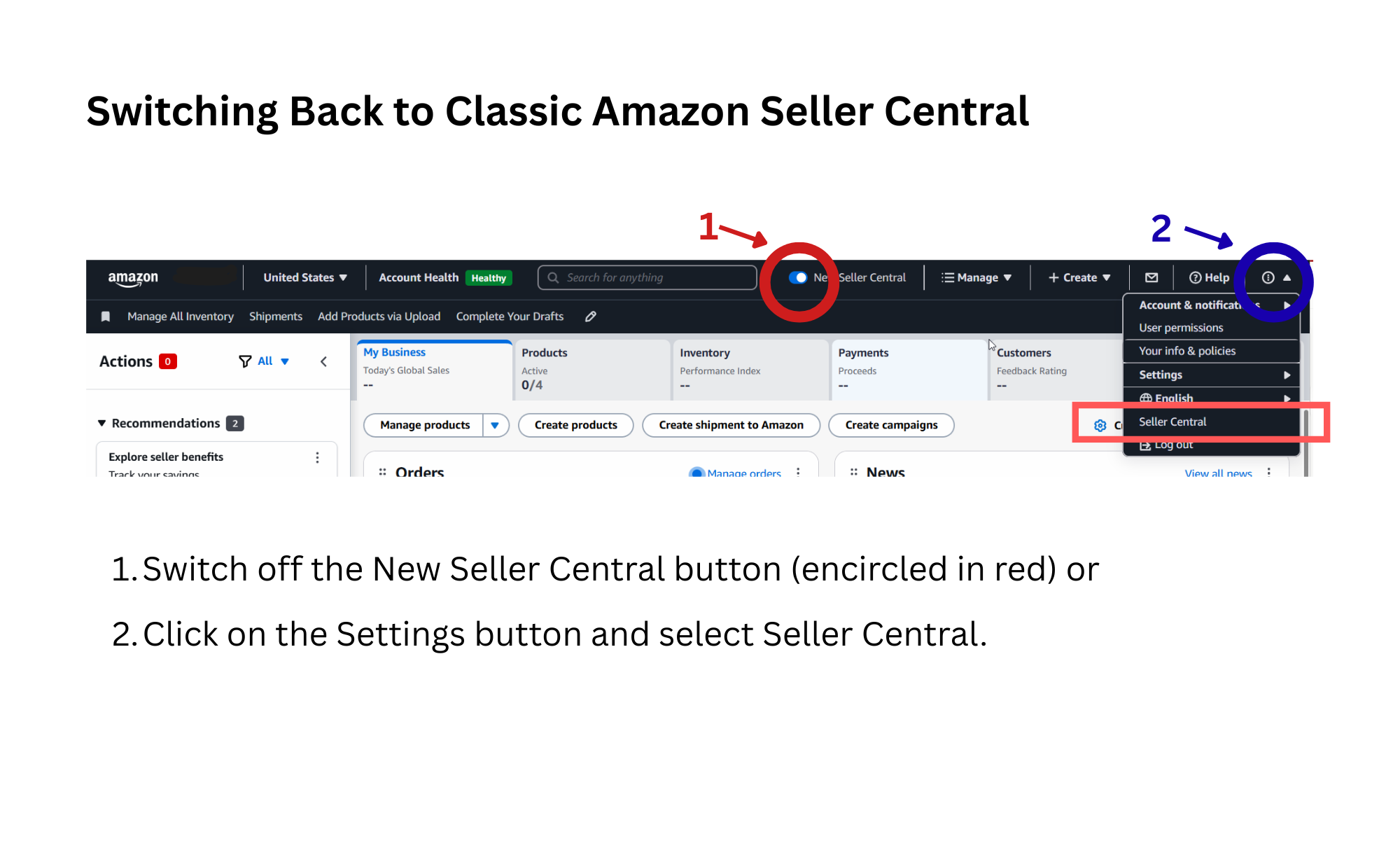
If you prefer to use the Classic Seller Central so everything matches older instructions or tutorials, you can switch back by following these steps:
OPTION 1:
Log in to Amazon Seller Central
Find the option that says “New Seller Central” and switch off the button
OPTION 2:
Look at the top-right corner of the page
Click Settings (gear icon or menu)
Find the option that says “Seller Central”
Click it and refresh the page
Your Seller Central should now display the classic layout.
Amazon may automatically switch you back to the new version in the future.
Some newer features may only be available in the new Seller Central.
Both versions access the same account and data — only the layout is different.